
This is a transcript of the video above. You can try WikiWatch live at wikiwatch.io, and the source code is on GitHub.
Wikipedia's Recent Changes Page
I was browsing Wikipedia at the weekend, and I stumbled on one of their special pages that, on the surface, looks kind of admin-y. But I saw potential. I ended up building something I think is quite fun, so I want to show you what I built and take you through how it's constructed. Maybe we'll learn something along the way.
Have a look at this. This is Wikipedia's Recent Changes page. It's a list of what's been changed in the past few minutes, and there's a huge number of pages that people have been editing.
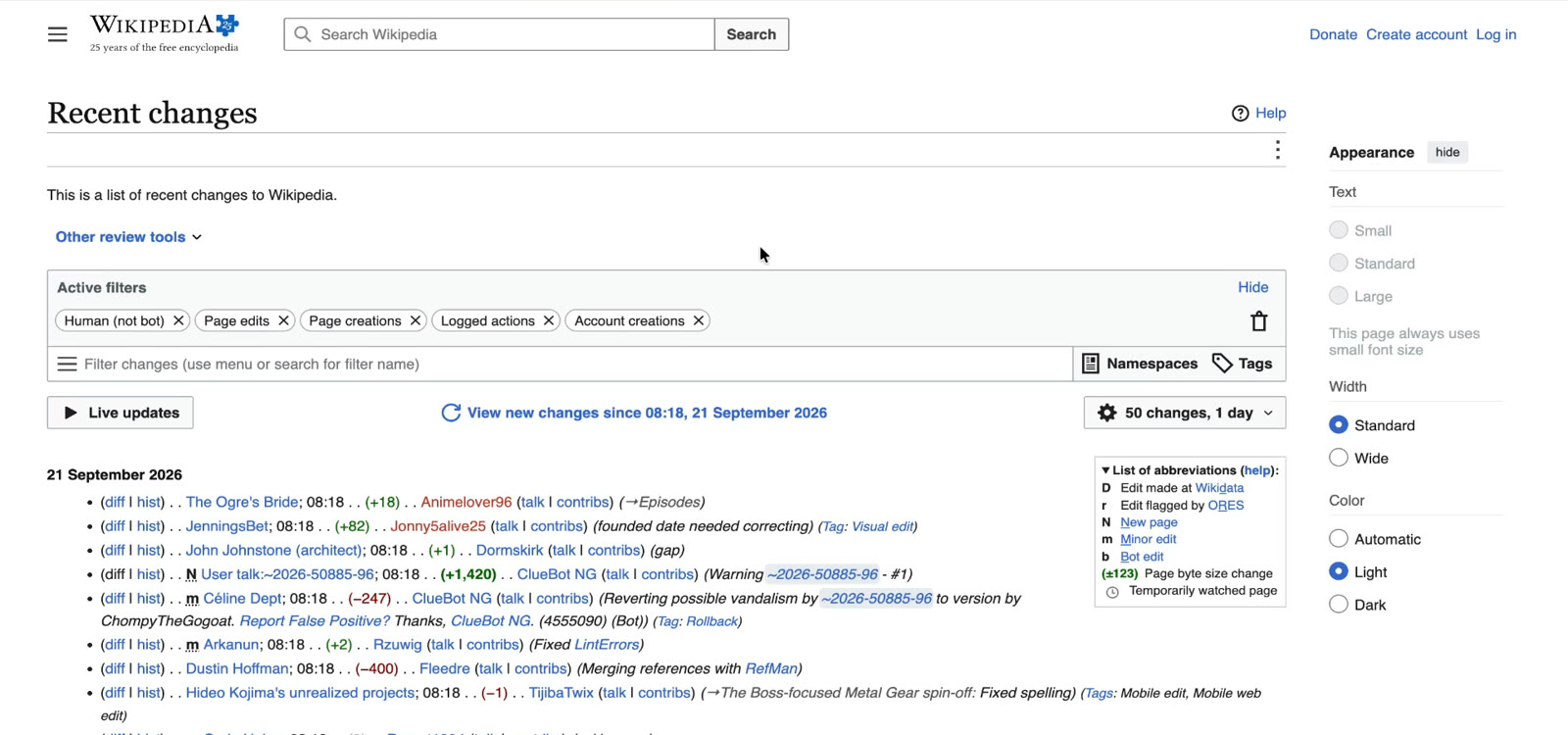
On the surface this is kind of dull, and I think that's okay. It's not supposed to be exciting. It's supposed to be a log file, and it does that job well. But I saw something in this. I thought if I could get hold of this information and manipulate it myself, I could build something a lot more compelling.
Building A Live Wikipedia Edit Leaderboard
So my first draft looks like this. I just grabbed everything that was on the edits list and started playing it back on my own server.
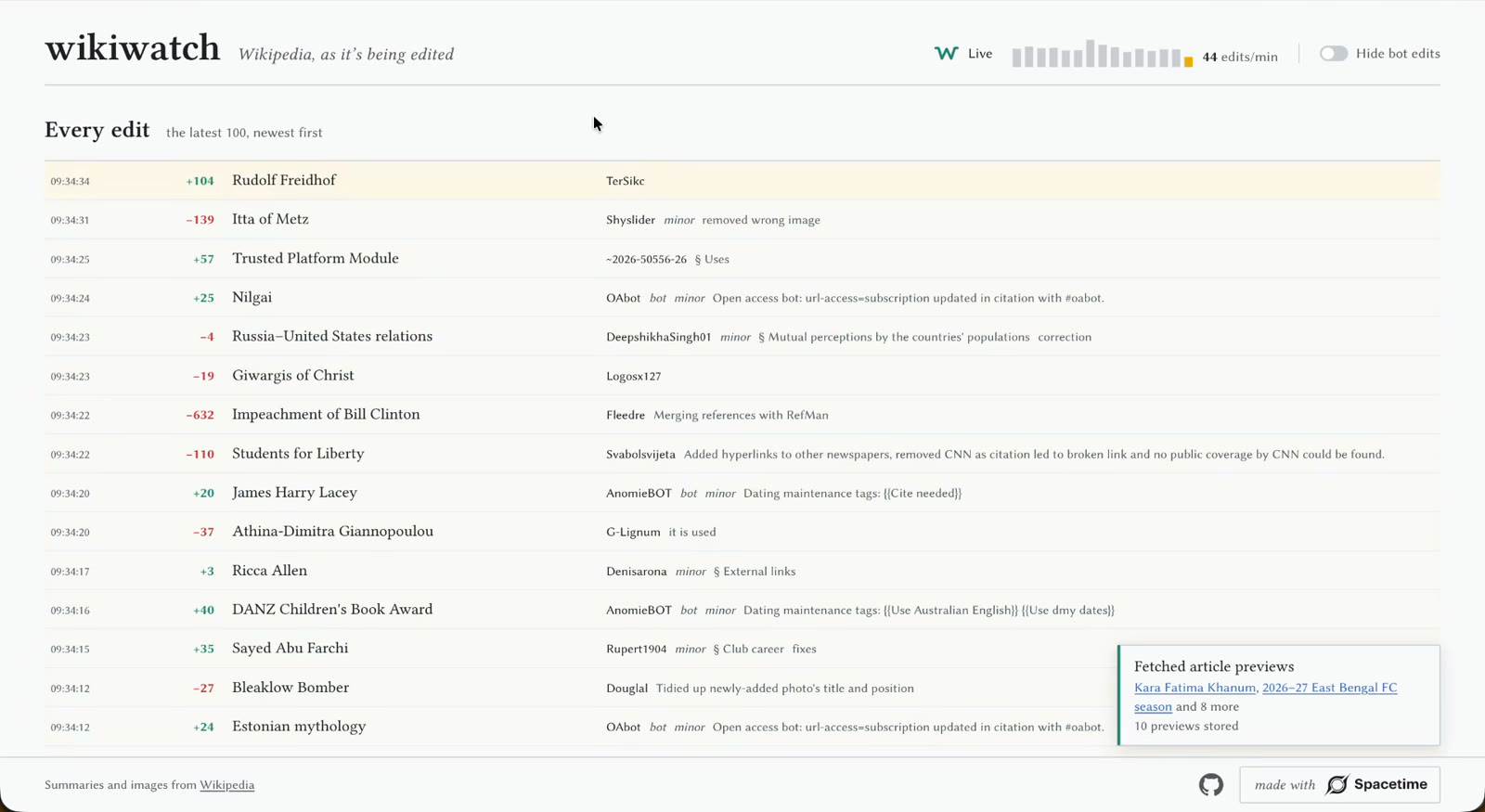
From that I was able to start crunching the numbers and come up with a leaderboard. This is the leaderboard of who's editing what, and what's the most popular thing to edit at the moment. It's currently the All India Football Federation.
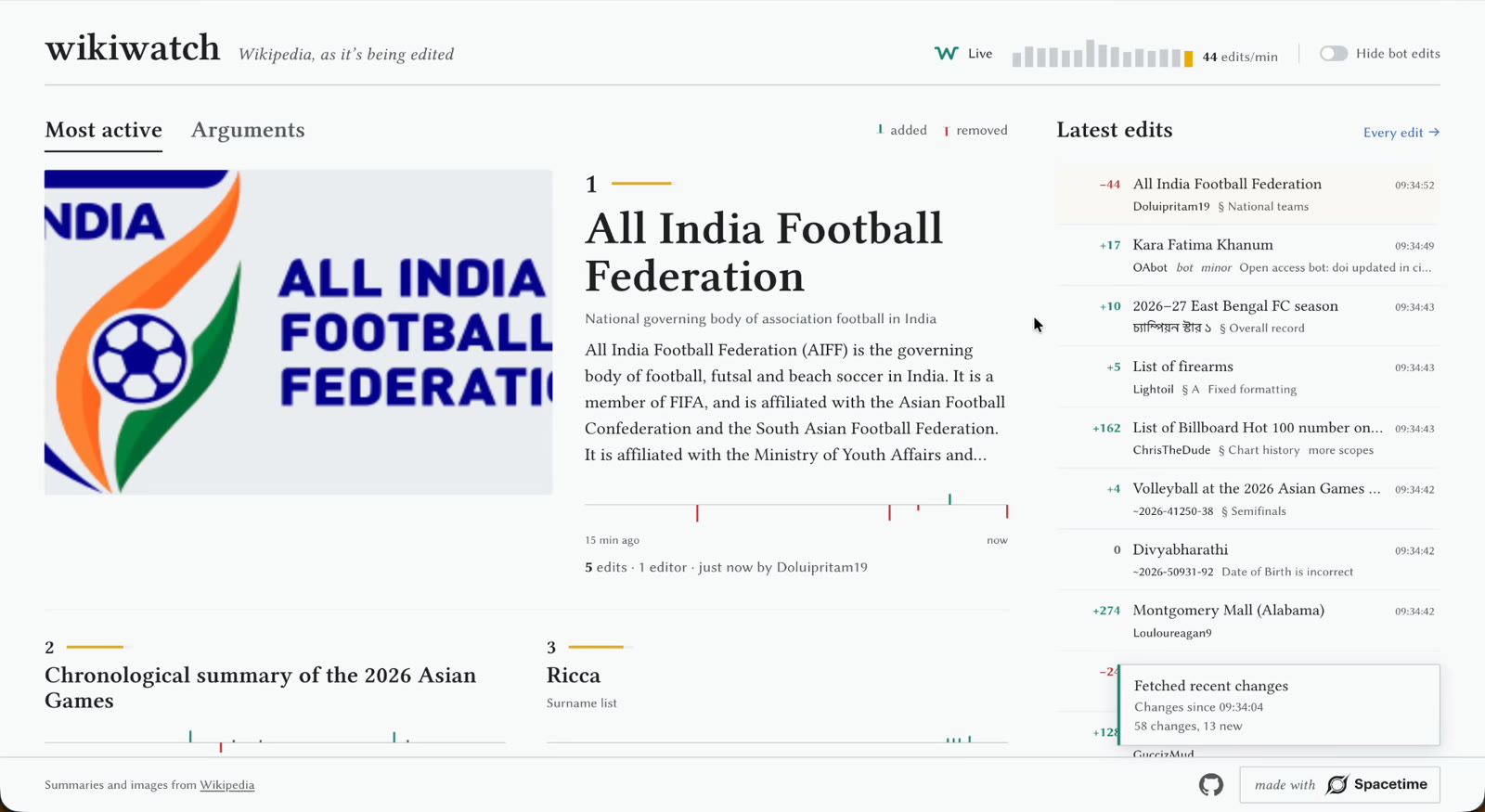
One thing I've learned looking at this: there's always plenty of sport in the top 100. There's Gérard Depardieu. I'm not going to touch him. I'm not going to go near that article. Self-Portrait with Death Playing the Fiddle. Who knew that was popular?
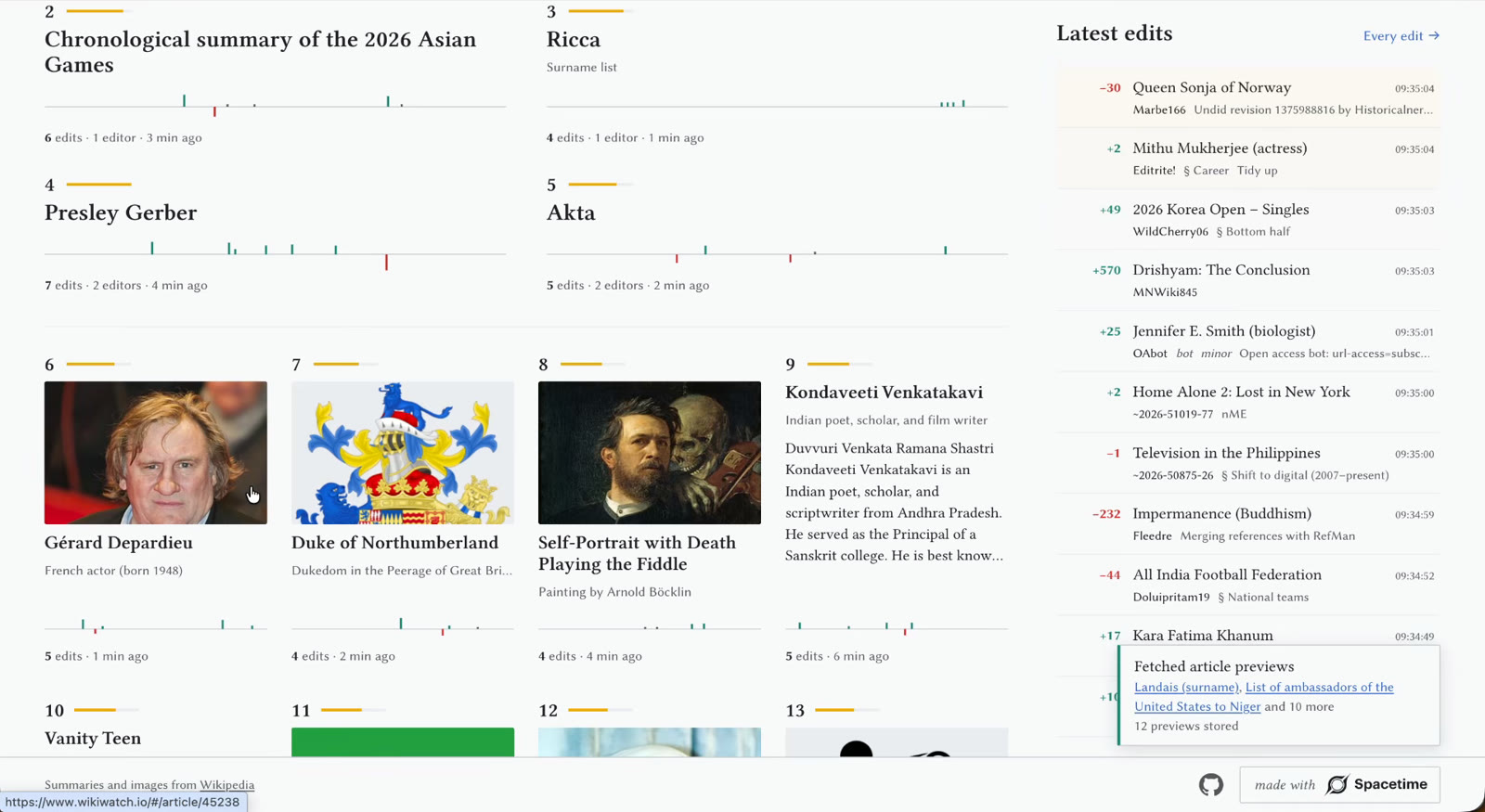
One thing I find fascinating about this is that really old questions, which you'd think would be long settled, are currently being edited. September the 8th. I wonder what happened. We'll find out. I'll dig into that later.
Detecting Wikipedia Edit Wars
I published it on the internet and sent it to a friend of mine. He looked around, and eventually he saw an article where people were arguing over it. Because you get this thing on Wikipedia: someone edits an article, someone disagrees with them and rolls their changes back. So they make the changes again, and someone rolls them back again, and you get this little bun fight of people arguing over a Wikipedia page.
Turns out you can detect this. And so my third and final page is the list of active arguments on Wikipedia.
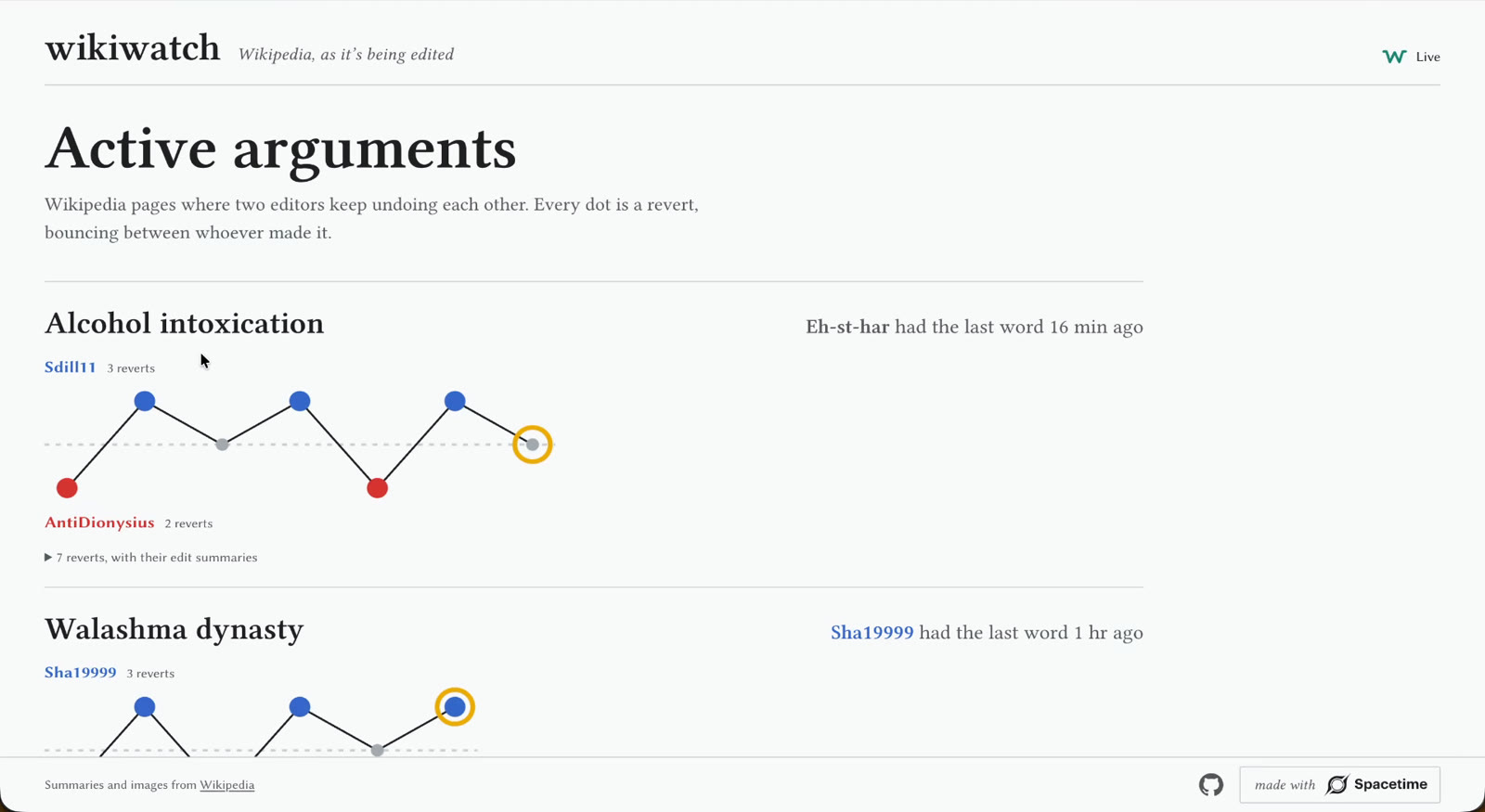
People are currently arguing about alcohol intoxication. Not too surprising. De Linke, whatever that is. There's an argument about Donut Lab. The Redeemed Zoomer. And Kansas seems to be controversial this morning. I wonder why.
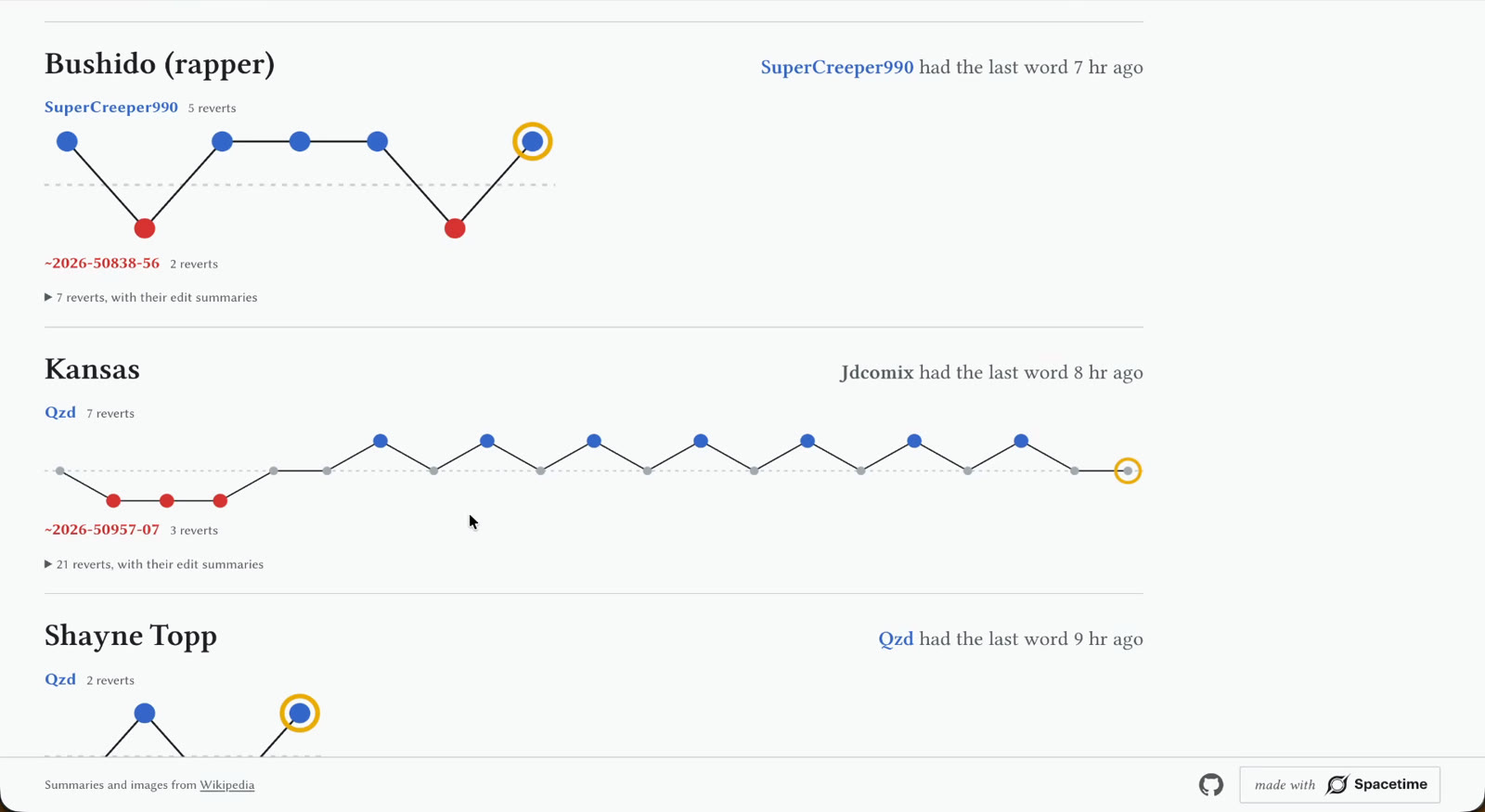
I think it's great fun. It's fun to look through and pick up bits of trivia you didn't know you were interested in.
I want to take some time and show you how this is built with Spacetime, and the general architecture, so if you want to build something similar yourself, you can. If you just want to see it, head to wikiwatch.io. It's live now. But for now, let's get stuck into the architecture.
Functions, Tables and Subscriptions
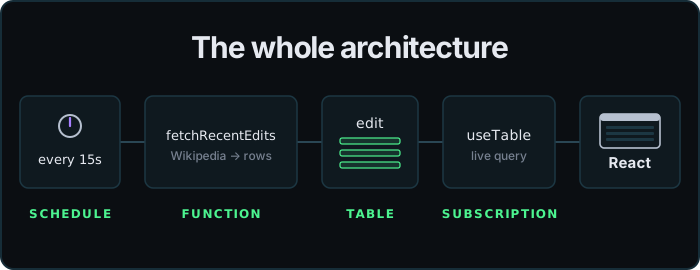
Fundamentally, the architecture for this isn't complicated. We just go to Wikipedia periodically, grab the latest data and store it somewhere, and then we want to ship the live changes over to the front end. That corresponds very neatly to the three big ideas in Spacetime. Three big ideas, three simple ideas: functions, tables and subscriptions.
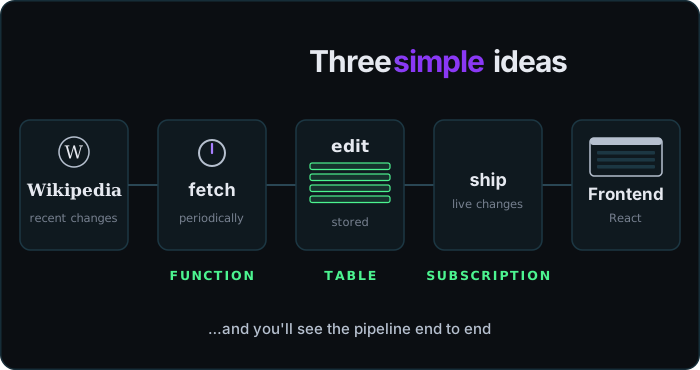
So let's break down the first Wikipedia special page, and you'll see how the end-to-end pipeline goes.
Turning Wikipedia's JSON Into A Table
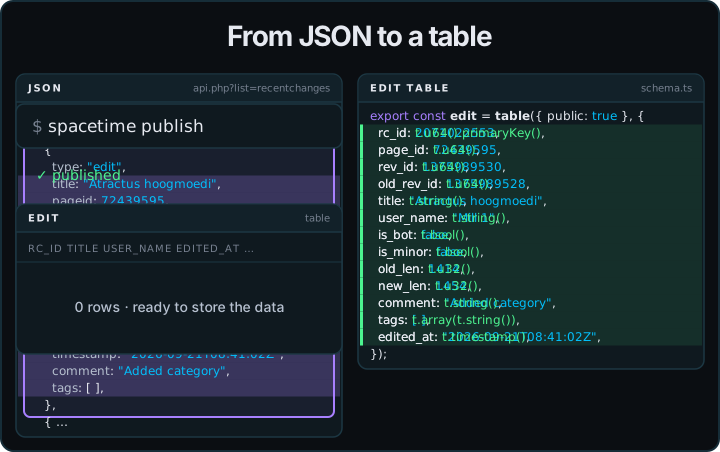
Going back to the Wikipedia page, they've got this list of edits. Luckily they also publish it as JSON, a structured data version, which looks like this.
So all I did was find the edit object I'm interested in and convert it into a Spacetime table definition by changing the values into the types of those values. Hit spacetime publish, and I've got a table ready to store the data. That part's pretty mechanical.
Writing The Fetcher Function
Next I need a function that's going to periodically go to Wikipedia and get the data. This is fairly straightforward stuff. It does an HTTP fetch and parses the JSON out, and now I've got a list of edits to put into my table. Open a transaction to the table and insert each one.
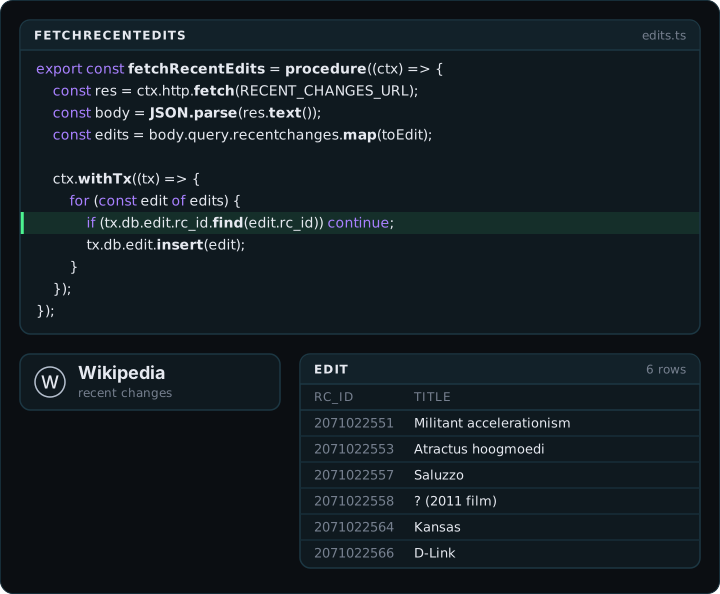
The only thing that makes this slightly complicated is that I'm checking for new edits on Wikipedia periodically, so there are going to be overlaps. There are going to be edits in there that I already saw last time. So I do a check before I insert to make sure it's not already in the database, and if it is, I skip it.
Now if I run that function regularly, I've captured all the information that Wikipedia has, and I can start displaying it.
Scheduling Functions With Tables
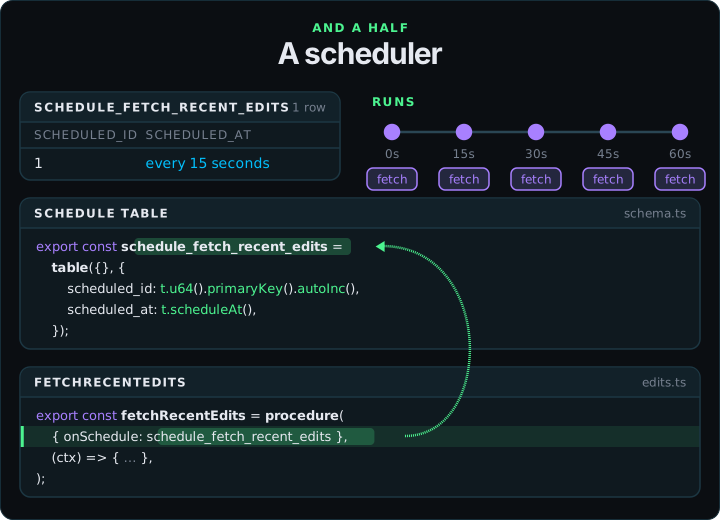
To do that, I need a half extra concept: a scheduler. They're really easy to set up in Spacetime. You need to decide how often it's running and store that somewhere. Where do you store that information? In a table. All data is stored in a table in Spacetime.
So you create a table that's going to store how often we run the fetch process, and then you point the function at that table, like this. And that does it. That will now run every 15 seconds.
Live Frontend Updates With useTable
So once I've got that going, I'm getting a feed of edits through to the backend. How do I display that on the front end?
This is one of my favourite parts of Spacetime, because it's super easy. You want something that will run in the front end (I'm using React for this) that will go off to the database, run a query, get the latest stuff, and then periodically be updated with the new stuff.
Actually, what you really want is to run the query, get the stuff, and then just be told when there's anything extra to add.
Actually, what you really want is to just say what you're interested in, and have it magically appear on the front end. And that's what Spacetime does.
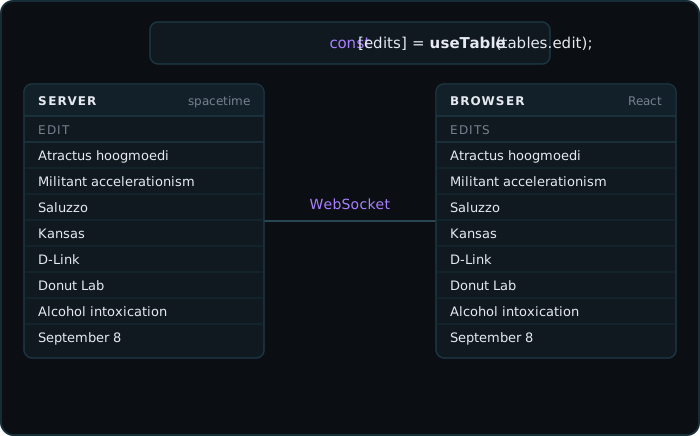
In React land, you just call useTable, supply your query, and the front end will magically have whatever the backend has. As new updates come in, they'll be shipped over a WebSocket, but you don't even need to worry about that. It's just live updated, and you can get on with the problem of rendering.
The code for this is super simple. This is what initially attracted me to Spacetime. If you want to keep the client in sync with what the server sees, it's trivial. The work is done for you.
So that's enough to give me my edit page and start live streaming data. And if we step back and take a look at that, that's pretty much the architecture that runs through this whole thing.
But it gets a bit more complicated. Not architecturally more complicated, but operationally more complicated. Let me show you what I mean.
Pruning 100,000 Edits A Day
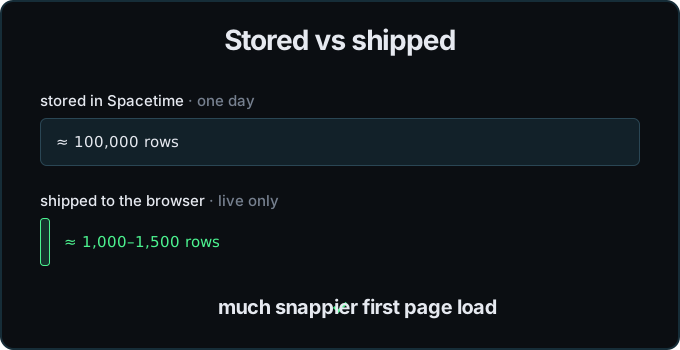
I had this up and running for a day or so, and I started to realise quite how many edits Wikipedia gets in a day. It's something like 100,000 rows a day. Now, I could store that many rows, and that would be okay for the database. I could ship them to the front end, but it gets sluggish, and that worries me more. I don't really want to do any of that. What I really want is to keep a live set of edits to look at and manipulate.
So I decided to do some filtering and pruning, with two extra jobs. One of them runs every few hours and says, "You know what? We don't need any edits that are older than a day, so delete them." That keeps the working set to about 100,000 rows.
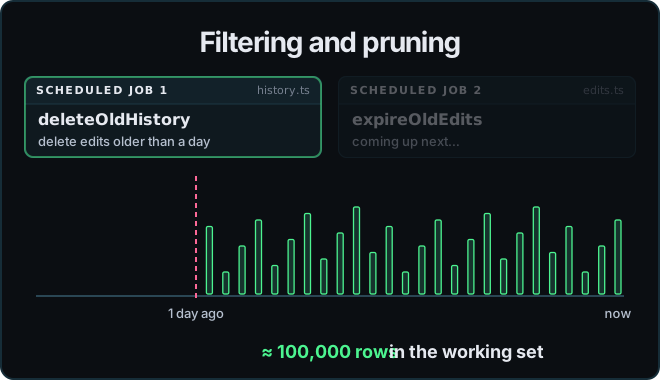
The other one is slightly more complicated. Even though I'd quite like to keep a day's worth of data, I don't really want to ship a day's worth of data to the front end, because it's not going to display that much. So I made a slight enhancement to my edit table. I added a live flag that says whether this is something that should be shown on the front end. Every new edit comes in as live, and then I set up another simple schedule that says, "If it's older than 15 to 30 minutes, flip that flag to false."
Then on the front end, my useTable goes from "grab all the edits" to "grab all the live edits", and that's all there is to it. That trims the front-end set down to, I think, about 1,000 to 1,500 rows usually, which is much more manageable and much snappier on that first page load.
Fetching Article Previews With A Join
The last part of this is that edits on their own look a bit dull. What you want is the flavour. You want the image, and some text telling you what you're looking at. So I also had to go and fetch previews for all these articles.
That again is the same pattern. I found a JSON endpoint, turned it into a table in Spacetime, and then wrote a fetcher.
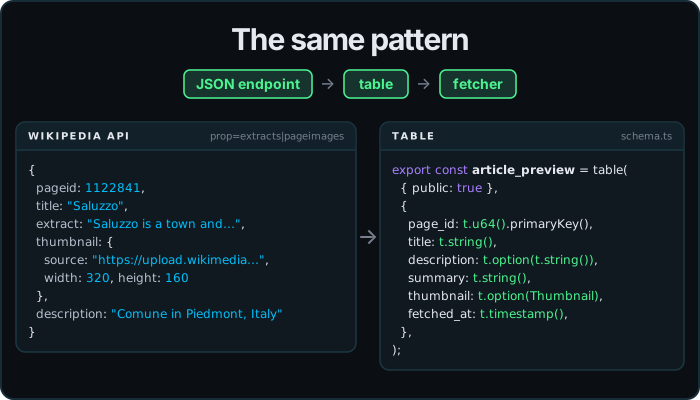
The only thing that makes this fetcher slightly more interesting is deciding which articles to fetch. That's a query. So I open a transaction to the database and ask which edits are live but don't already have a preview. Then I do the fetch, and then another transaction that inserts the previews I've grabbed.
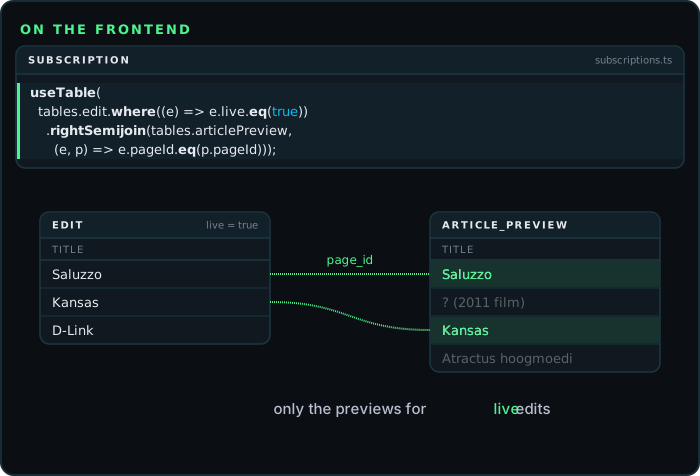
Lastly, I go to the front end, and instead of using a table directly, I use useTable with a join to figure out which previews I want to see for the edits that are relevant.
Recap: Three And A Half Pieces
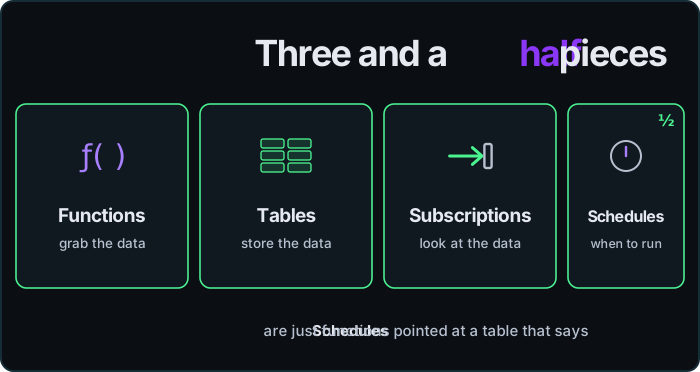
And that's pretty much the whole thing. It's all built from three and a half pieces. You've got functions, which grab the data; tables, which store the data; subscriptions, which look at the data; and schedules, which are really only functions that point at tables telling them when to run.
If you want to check it out live, it's on wikiwatch.io. If you want the source code, that's on GitHub. And if you've got any questions, or there's anything you'd like more detail about, leave a comment on the video and I'll get back to you.
Thanks for reading!